Horizon
Choose 15 minutes, 1 hour or 4 hours at the top. Factor weights change. This is an analytical horizon, not a promised target deadline.
Related field explanations: Horizon 15m / 1h / 4h
↑ Back to the A–F diagramLOGRI · Forecast
Forecast combines technical signals, positions, funding and news. Its model estimate and entry status are separate. A high percentage without confirmation is not a ready trade.
Read steps 1–4, then open the working section. Return to the explanations below whenever you encounter an unfamiliar field.
Refresh Forecast and check scan coverage before comparing coins.
See the explanation on this page: B · Coin selection
Choose 15 minutes, 1 hour or 4 hours. Factor weights change for the selected horizon.
See the explanation on this page: A · Horizon
Select a coin. Read direction and status, then all four factor cards and their freshness.
See the explanation on this page: C · Estimate and status · D · Four factors
When a plan exists, enter illustrative risk inputs to see size and margin. This places no order and does not override Wait.
See the explanation on this page: E · Historical outcome · F · Position size
A–F identify areas of this learning diagram, not button numbers or a sequence of actions. Select an area to jump to its explanation below. Working panels may stack vertically on a phone.
Scroll the enlarged diagram horizontally. Select this heading again to collapse it. All explanations stay on this page.
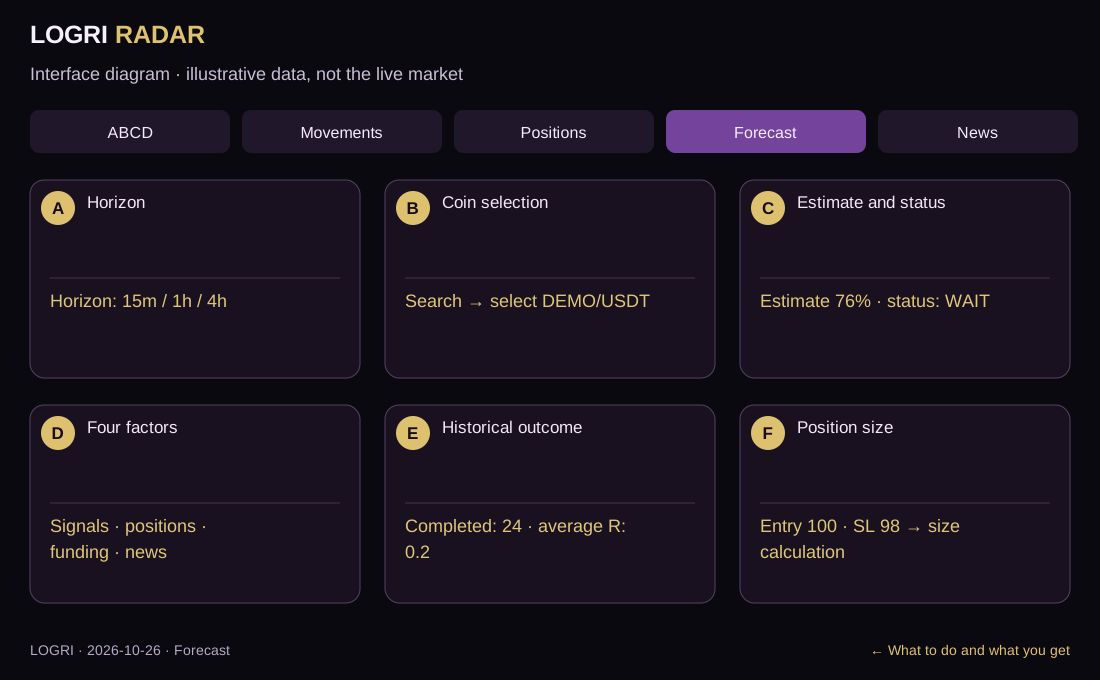
Choose 15 minutes, 1 hour or 4 hours at the top. Factor weights change. This is an analytical horizon, not a promised target deadline.
Related field explanations: Horizon 15m / 1h / 4h
↑ Back to the A–F diagramFind a coin through search and select it. Estimate, explanations and history now refer to that coin. If missing, clear search and check coverage messages.
Related field explanations: Market checked / coin selection
↑ Back to the A–F diagramRead the status before the percentage. In the example, 76% plus Wait for confirmation means factors exist but entry is not ready. The percentage cannot override Wait.
Related field explanations: Movement probability, % · Entry confirmed / Wait / Watch / Do not enter
↑ Back to the A–F diagramRead Signals, Positions, Funding and News cards. Compare Current, contribution and freshness in each. A dash means missing data, not confirmation.
Related field explanations: Signals / Positions / Funding / News · Factor freshness
↑ Back to the A–F diagramIn Historical performance, read completed sample size and average R. R expresses results in initial-risk units. A small sample cannot establish reliable performance.
Related field explanations: Enough history / Insufficient history · Win rate / Completed / Average R
↑ Back to the A–F diagramWhen a plan exists, change illustrative balance, risk % and leverage in Trade risk. Size and margin update. Inputs neither create a missing signal nor place orders.
Related field explanations: Balance / risk % / leverage · Entry / stop / cash risk / size / margin
↑ Back to the A–F diagram| On screen | How to read and use it |
|---|---|
| Market checked / coin selection | Coverage progress and selection. Compare estimates in the context of time and available factors. |
| Horizon 15m / 1h / 4h | The analytical horizon changes factor weights; it is not a guaranteed exit deadline. |
| Movement probability, % | The UI label for a model combination of factors, not a proven success probability for your trade or a future return. |
| Entry confirmed / Wait / Watch / Do not enter | A separate model decision requiring aligned direction, confirmed technical state and no blocks. A percentage does not replace it. |
| Signals / Positions / Funding / News | Four sources of evidence. Read Current, not just the bar; a missing factor displays a dash. |
| Factor freshness | Source-specific timing: news and technical candles can have different timestamps. Refreshing the page does not align them. |
| Enough history / Insufficient history | The current model threshold is 20 completed observations with a measured win rate. This is an implementation threshold, not proof of statistical reliability. |
| Win rate / Completed / Average R | Historical success share, sample size and average result in initial-risk units. Check cost treatment; this is not your wallet statement. |
| Balance / risk % / leverage | Sizing inputs, not an automatically verified exchange balance. Leverage changes required margin, not the safety of a loss. |
| Entry / stop / cash risk / size / margin | A plan-based calculation. Insufficient margin reduces size; fees, funding, slippage and liquidation require separate checks. |
The diagram shows 76% but Wait for confirmation. Directional factors exist, yet entry conditions are incomplete. 76% is not a guaranteed win rate.
↑ Back to the A–F diagramA–F identify areas of this learning diagram, not button numbers or a sequence of actions. Select an area to jump to its explanation below. Working panels may stack vertically on a phone.
What to do and what you get · Screen mapIf the working screen requires sign-in, open Access and verify your email. Features depend on your plan; guides remain public. An empty result is not a reason to change rules just to find a trade.
Open sign-in and accessAll guides are linked at the top and bottom. Use the named section button for practice and Next guide to continue learning.
All guidesThe working section’s How to use button brings you back here. If sign-in appears, verify your email and select the required tab again.
Educational guide. Model scores do not guarantee a trade outcome. Reading a guide or viewing Radar does not place orders.