Age filters
Choose 48 hours, 1 hour or 15 minutes above the news list. This limits publication age, not candle timeframe.
Related field explanations: Published / refreshed time
↑ Back to the A–F diagramLOGRI · News
Compare the event and its source with the price response. News, projected impact and observed movement are three different things.
Read steps 1–4, then open the working section. Return to the explanations below whenever you encounter an unfamiliar field.
Open News and choose 48 hours, 1 hour or 15 minutes. This filters event age, not a chart timeframe.
See the explanation on this page: A · Age filters
Filter all, upside, downside or high-impact events. This changes the news sample, not the market.
See the explanation on this page: B · Coin and event
Open the card’s source to check date, the exact event and original wording; the displayed headline may be translated.
See the explanation on this page: C · Date and source
Compare projected and observed movement, then reaction status. Use the other tabs for a trade plan; a news card is not an order.
See the explanation on this page: D · Projected movement · E · Observed response · F · Confidence and impact
A–F identify areas of this learning diagram, not button numbers or a sequence of actions. Select an area to jump to its explanation below. Working panels may stack vertically on a phone.
Scroll the enlarged diagram horizontally. Select this heading again to collapse it. All explanations stay on this page.
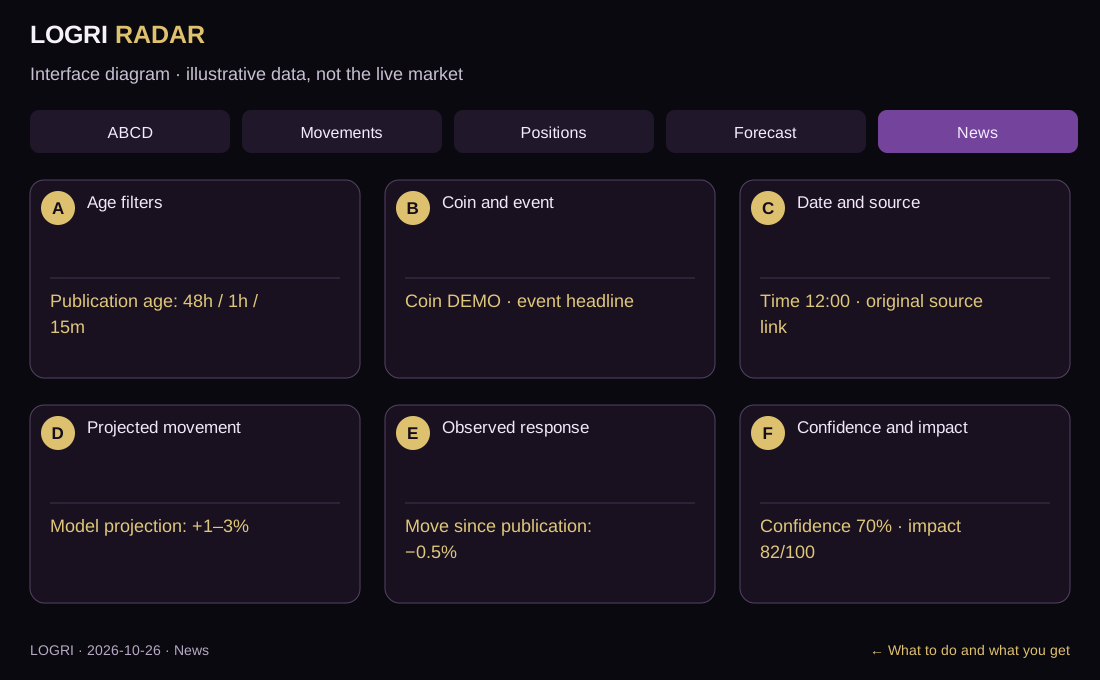
Choose 48 hours, 1 hour or 15 minutes above the news list. This limits publication age, not candle timeframe.
Related field explanations: Published / refreshed time
↑ Back to the A–F diagramRead the coin, headline and event type in the card. Direction and impact filters narrow the list. Verify the exact asset rather than a similar name.
Related field explanations: Coin / event type · Event amount
↑ Back to the A–F diagramSelect the source link to open the original story on another website. Check its date and wording, then return using the browser tab or Back. The source is outside LOGRI.
Related field explanations: Published / refreshed time · Source / Open story
↑ Back to the A–F diagramRead Movement forecast. +1–3% is the model’s projected response, not an earned return or a trading plan.
Related field explanations: Movement projection and horizon
↑ Back to the A–F diagramCompare Movement since publication. −0.5% versus a +1–3% projection is a response in the opposite direction so far. Match timestamps and distinguish observed data from projections.
Related field explanations: Move since publication · Reaction aligned / News not confirmed · Wait for reaction / No price check
↑ Back to the A–F diagramRead confidence and impact strength next. Both are model estimates, not guarantees. Continue to Signals or Forecast and select the relevant coin manually.
Related field explanations: Confidence, % / impact, /100
↑ Back to the A–F diagram| On screen | How to read and use it |
|---|---|
| Coin / event type | Linked asset and category, such as listing, hack or investment. A news funding event is not a futures funding rate. |
| Published / refreshed time | Publication and retrieval times differ. An older story can be present in a fresh refresh. |
| Source / Open story | Link to the original story. Verify the primary source, not just the translation or short explanation. |
| Event amount | Reported transaction or event amount, not a coin target price or the user’s expected income. |
| Confidence, % / impact, /100 | Model classification and impact scores, not the same chance of profit. High impact currently filters scores of at least 82/100. |
| Movement projection and horizon | A model range, for example +1–3%, not a promised target or the observed response. |
| Move since publication | Observed change against the story’s reference price, not trading-account performance. A dash means no price check. |
| Reaction aligned / News not confirmed | A comparison of price direction with the news hypothesis, not a truth verdict. An opposite move does not prove the story false. |
| Wait for reaction / No price check | The move is not yet clear or a quote is unavailable. Missing data is neither zero reaction nor a ready signal. |
The diagram projects +1–3%, while the observed move is −0.5%. This is a mismatch between model and response, not a confirmed buy. Check the original source and context.
↑ Back to the A–F diagramA–F identify areas of this learning diagram, not button numbers or a sequence of actions. Select an area to jump to its explanation below. Working panels may stack vertically on a phone.
What to do and what you get · Screen mapIf the working screen requires sign-in, open Access and verify your email. Features depend on your plan; guides remain public. An empty result is not a reason to change rules just to find a trade.
Open sign-in and accessAll guides are linked at the top and bottom. Use the named section button for practice and Next guide to continue learning.
All guidesThe working section’s How to use button brings you back here. If sign-in appears, verify your email and select the required tab again.
Educational guide. Model scores do not guarantee a trade outcome. Reading a guide or viewing Radar does not place orders.