Refresh and coverage
Click Refresh movers at the top. Wait, then read Scanned and On both exchanges. These measure data coverage, not trades.
Related field explanations: Scanned / On two venues
↑ Back to the A–F diagramLOGRI · Movements
This ranks price moves that already happened over 12 hours and adds possible continuation or reversal scenarios. A top gainer or loser is not automatically an entry.
Read steps 1–4, then open the working section. Return to the explanations below whenever you encounter an unfamiliar field.
Click Refresh movements to obtain checked markets and leading gainers and losers.
See the explanation on this page: A · Refresh and coverage
Search a ticker or select a ranked coin to show its chart and scenario.
See the explanation on this page: B · 12-hour ranking
Compare both venue quotes, stage and trigger. A divergent or awaiting-quote state is not a current entry price.
See the explanation on this page: C · Stage and direction · D · Two venue quotes · E · Trigger, SL and TP
Separate past movement, forecast and recorded model entry. Working describes model tracking, not a position in your exchange account.
See the explanation on this page: F · Progress and time
A–F identify areas of this learning diagram, not button numbers or a sequence of actions. Select an area to jump to its explanation below. Working panels may stack vertically on a phone.
Scroll the enlarged diagram horizontally. Select this heading again to collapse it. All explanations stay on this page.
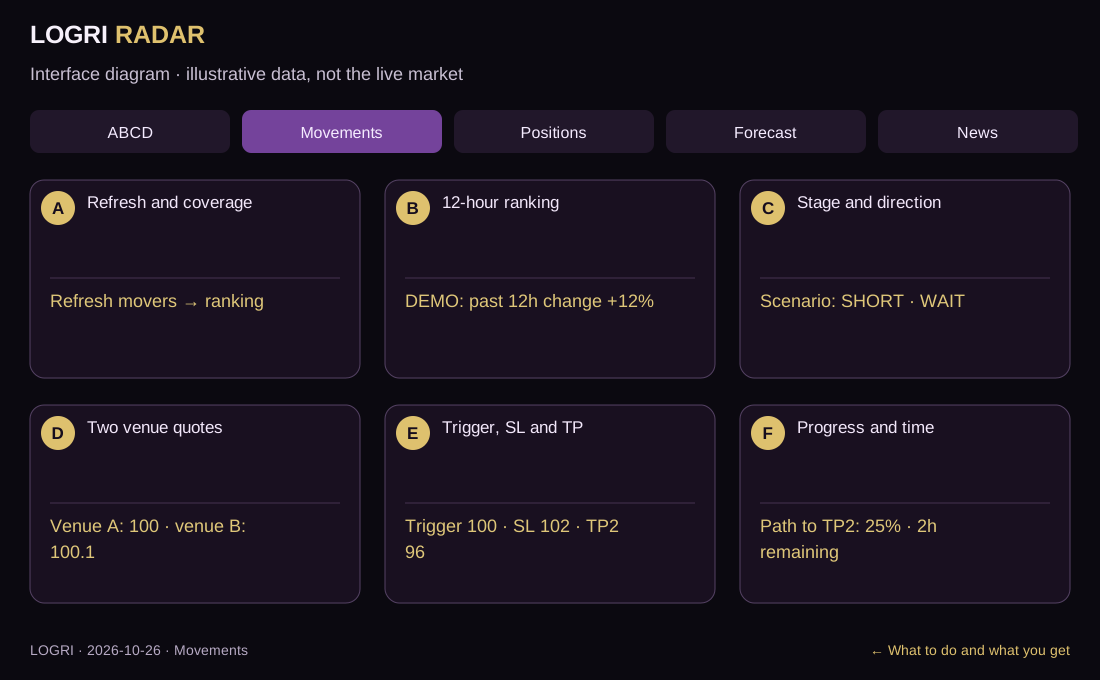
Click Refresh movers at the top. Wait, then read Scanned and On both exchanges. These measure data coverage, not trades.
Related field explanations: Scanned / On two venues
↑ Back to the A–F diagramSelect a coin from TOP GAINERS or TOP LOSERS, or use ticker search. Its details appear. +12% is the move over the past 12 hours, not a forecast.
Related field explanations: Top-five gainers / losers and 12h %
↑ Back to the A–F diagramRead scenario, direction and stage in the details. SHORT after a rise may describe a reversal hypothesis. Pattern confirmation and a recorded model entry are different states.
Related field explanations: Impulse / Pullback / Confirmed · Reversal and strength /100
↑ Back to the A–F diagramCompare the two exchange quotes and their gap. If divergence blocks the scenario or a quote is missing, wait for fresh, consistent data instead of using an old price.
Related field explanations: Two venue quotes / spread · Awaiting quote / Divergence / Late
↑ Back to the A–F diagramFind trigger, SL and TP in Trade scenario. A trigger is a condition that may still be unmet. When the scenario is blocked, the absent plan is intentional.
Related field explanations: Primary scenario / trigger / invalidation · TP2 projection / entry / SL / TP
↑ Back to the A–F diagramCheck Path to TP2 and time remaining beside the scenario. They describe model tracking. In progress does not mean a trade opened on your exchange.
Related field explanations: 12h range / 15m volume / pullback depth · Working / TP2 progress / best / time remaining
↑ Back to the A–F diagram| On screen | How to read and use it |
|---|---|
| Scanned / On two venues | Scan coverage and matched markets, not the number of trades. |
| Top-five gainers / losers and 12h % | A past price change, not a future return or TP2 projection. |
| Two venue quotes / spread | A consistency check. The difference is not executable arbitrage profit; timing, fees and fills matter. |
| Impulse / Pullback / Confirmed | Pattern stage. Pattern confirmation is separate from a recorded model entry. |
| Awaiting quote / Divergence / Late | A missing quote, inconsistent sources or a stale entry. Do not reconstruct a blocked plan from an old image. |
| Reversal and strength /100 | A separate reversal scenario, not continuation of the ranked move. Strength is a model score, not fill probability. |
| Primary scenario / trigger / invalidation | Direction, activation condition and invalidation level. Check the condition before using levels. |
| TP2 projection / entry / SL / TP | Calculated levels and distance to target, not a promised move. Review planned close fractions too. |
| 12h range / 15m volume / pullback depth | Different measures of range, activity and retracement. They are not one common scale. |
| Working / TP2 progress / best / time remaining | Tracking state, progress and time window. Progress is not the user’s realized profit. |
A coin gained 12%, while its scenario says downward reversal. The 12% describes the past; SHORT is a separate hypothesis. Neither is a promised return.
↑ Back to the A–F diagramA–F identify areas of this learning diagram, not button numbers or a sequence of actions. Select an area to jump to its explanation below. Working panels may stack vertically on a phone.
What to do and what you get · Screen mapIf the working screen requires sign-in, open Access and verify your email. Features depend on your plan; guides remain public. An empty result is not a reason to change rules just to find a trade.
Open sign-in and accessAll guides are linked at the top and bottom. Use the named section button for practice and Next guide to continue learning.
All guidesThe working section’s How to use button brings you back here. If sign-in appears, verify your email and select the required tab again.
Educational guide. Model scores do not guarantee a trade outcome. Reading a guide or viewing Radar does not place orders.