Scan coverage
Compare analysed and watchlist counts, then the update time. Partial coverage is an incomplete overview. Refresh if needed and wait for results.
Related field explanations: Watchlist / analysed / updated
↑ Back to the A–F diagramLOGRI · Positions
Positions is a market-data overview, not your personal trades. Compare price, open interest (OI), volume and funding, then inspect the scenario in Forecast.
Read steps 1–4, then open the working section. Return to the explanations below whenever you encounter an unfamiliar field.
Open Positions and check analysed / watchlist coverage to see whether the scan is complete.
See the explanation on this page: A · Scan coverage
Search a ticker or sort by price, OI, funding or spread to inspect different slices of the same sample.
See the explanation on this page: B · Search and sorting
Read all four card metrics and its status. A large OI or funding value alone does not define an entry.
See the explanation on this page: C · Mechanism and status · D · Price and OI · E · Volume and funding · F · Model Score
Check the same coin in Forecast and Signals for agreement or conflict, not an automatic order.
See the explanation on this page: F · Model Score
A–F identify areas of this learning diagram, not button numbers or a sequence of actions. Select an area to jump to its explanation below. Working panels may stack vertically on a phone.
Scroll the enlarged diagram horizontally. Select this heading again to collapse it. All explanations stay on this page.
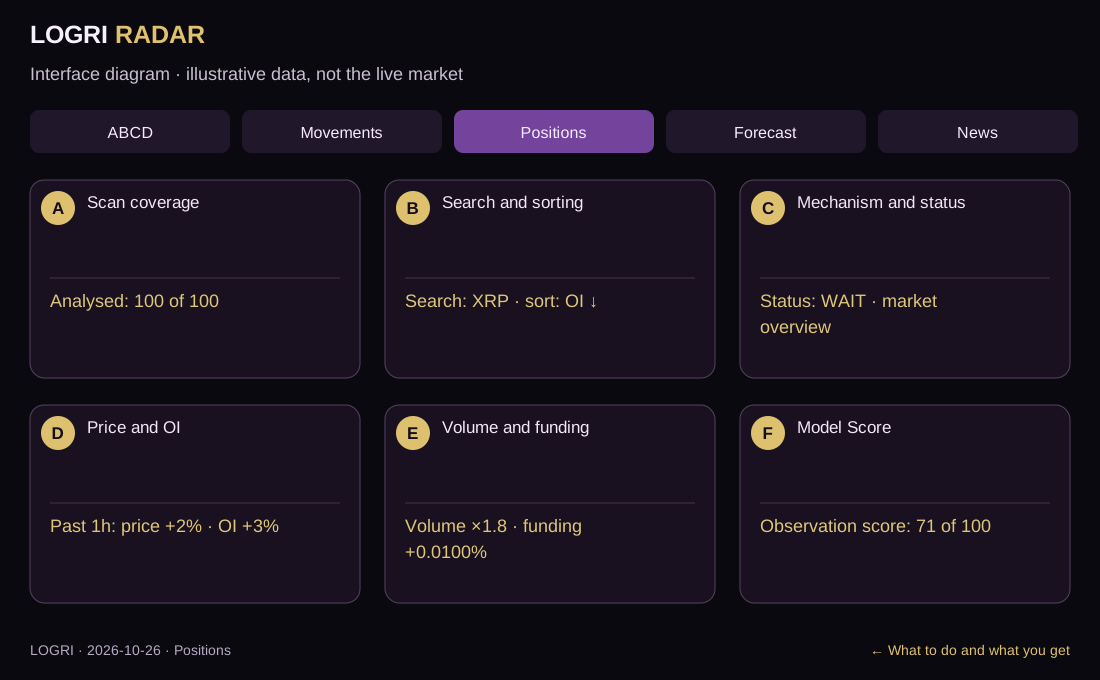
Compare analysed and watchlist counts, then the update time. Partial coverage is an incomplete overview. Refresh if needed and wait for results.
Related field explanations: Watchlist / analysed / updated
↑ Back to the A–F diagramSearch above the cards or choose sorting by price, OI or funding. Card order changes. Clear search to restore the list; filters change the display, not market data.
Related field explanations: Search, filters and sorting
↑ Back to the A–F diagramRead mechanism and status first. Long buildup interprets a combination of data; Wait means no entry confirmation. These are market observations, not your personal positions.
Related field explanations: Mechanism: buildup / squeeze / impulse · Observation score /100 and status
↑ Back to the A–F diagramCompare hourly price and open-interest changes in the same card. +2% and +3% refer to different quantities. Rising OI alone does not prove buyers are winning.
Related field explanations: Price · 1h · Open interest · 1h · OI in $
↑ Back to the A–F diagramCompare volume versus baseline and venue funding. ×1.8 measures activity; +0.0100% is a periodic payment rate, not price growth. Check intervals and freshness.
Related field explanations: Volume versus baseline × · Funding and venues · Funding spread
↑ Back to the A–F diagramRead observation strength /100 and status after the metrics. 71/100 is a model score, not a 71% profit probability. Select the same coin manually in Forecast; selection is not transferred between tabs.
Related field explanations: Observation score /100 and status
↑ Back to the A–F diagram| On screen | How to read and use it |
|---|---|
| Watchlist / analysed / updated | Coverage, progress and data time. Some markets may still await analysis; a freshly opened page can contain an older snapshot. |
| Price · 1h | Hourly price change, not the return on your position. |
| Open interest · 1h | Change in open contracts. Each contract has a buyer and seller, so rising OI alone does not prove new long positioning. |
| OI in $ | Source open-interest size, not account balance or hourly buying volume. |
| Volume versus baseline × | ×2 means roughly twice the model’s volume baseline, not twice the price. |
| Funding and venues | A periodic perpetual-contract payment rate. Check sign, interval and venue rules separately; it is not an annual return. |
| Funding spread | Difference across available rates. Compare intervals and freshness; the card does not execute arbitrage. |
| Mechanism: buildup / squeeze / impulse | An algorithmic interpretation of price, OI and volume, not proof of participants’ intentions or liquidations. |
| Observation score /100 and status | A model score, not profit probability. Watch and Wait are not entry confirmation; Do not enter is a block. |
| Search, filters and sorting | They change the displayed sample, not market data. Not tracked differs from no significant change. |
The diagram shows price +2%, OI +3% and volume ×1.8. Long buildup is a model interpretation, not an entry. Funding and status can still require waiting; compare Forecast.
↑ Back to the A–F diagramA–F identify areas of this learning diagram, not button numbers or a sequence of actions. Select an area to jump to its explanation below. Working panels may stack vertically on a phone.
What to do and what you get · Screen mapIf the working screen requires sign-in, open Access and verify your email. Features depend on your plan; guides remain public. An empty result is not a reason to change rules just to find a trade.
Open sign-in and accessAll guides are linked at the top and bottom. Use the named section button for practice and Next guide to continue learning.
All guidesThe working section’s How to use button brings you back here. If sign-in appears, verify your email and select the required tab again.
Educational guide. Model scores do not guarantee a trade outcome. Reading a guide or viewing Radar does not place orders.